Features/Penalties
Try it free →
07
Officiating · Competition → Penalties

Penalties that flow straight into the results.

A race-type-flexible penalty system. Triathlon's penalty box is one preset, not the whole model - it works for any sport. Add time, record a served penalty, log a warning, or change an athlete's status, and watch the ranking refresh on its own.

Lives in
Competition → Penalties
Decisions
Time-added · served · warning
Status
DNF · LAP · DSQ, audited apart
Roles
Course · zone · referee
The idea

One model that fits every sport's rule book.

A penalty can mean three very different things, so RaceTime carries three. A time-added penalty adds seconds to the official result. A served penalty records that the athlete served their time - often with the duration shown - without touching their ranking time. A warning logs an official caution with no time at all. Status decisions - DNF, DSQ, and LAP (lapped - available for multi-stage and multisport races) - are tracked separately from time penalties, so a disqualification is never tangled up with a thirty-second add.

Triathlon's penalty box is just one preset. The model underneath fits road, trail, multisport - any rule book that hands out time, makes athletes serve it, or simply warns them.
3 penalty types
Time-added, served and warning - plus separate status decisions for DNF, DSQ and LAP.
Live to rankings
Confirm a time-added penalty and the adjusted time and finishing order refresh automatically.
EN · PL · DE · FR · ES
Every official screen and public marker reads in English, Polish, German, French and Spanish.
Fully audited
Every decision records who issued it and when - pending or confirmed, kept on the record.
Set it up

Turn it on per competition, then hand out the right desk to each role.

Everything starts at one switchboard. Decide how penalties behave, how they appear to the public, and who gets which job - then officials open a link and start working.

racetime.net / competition / penalties / settings
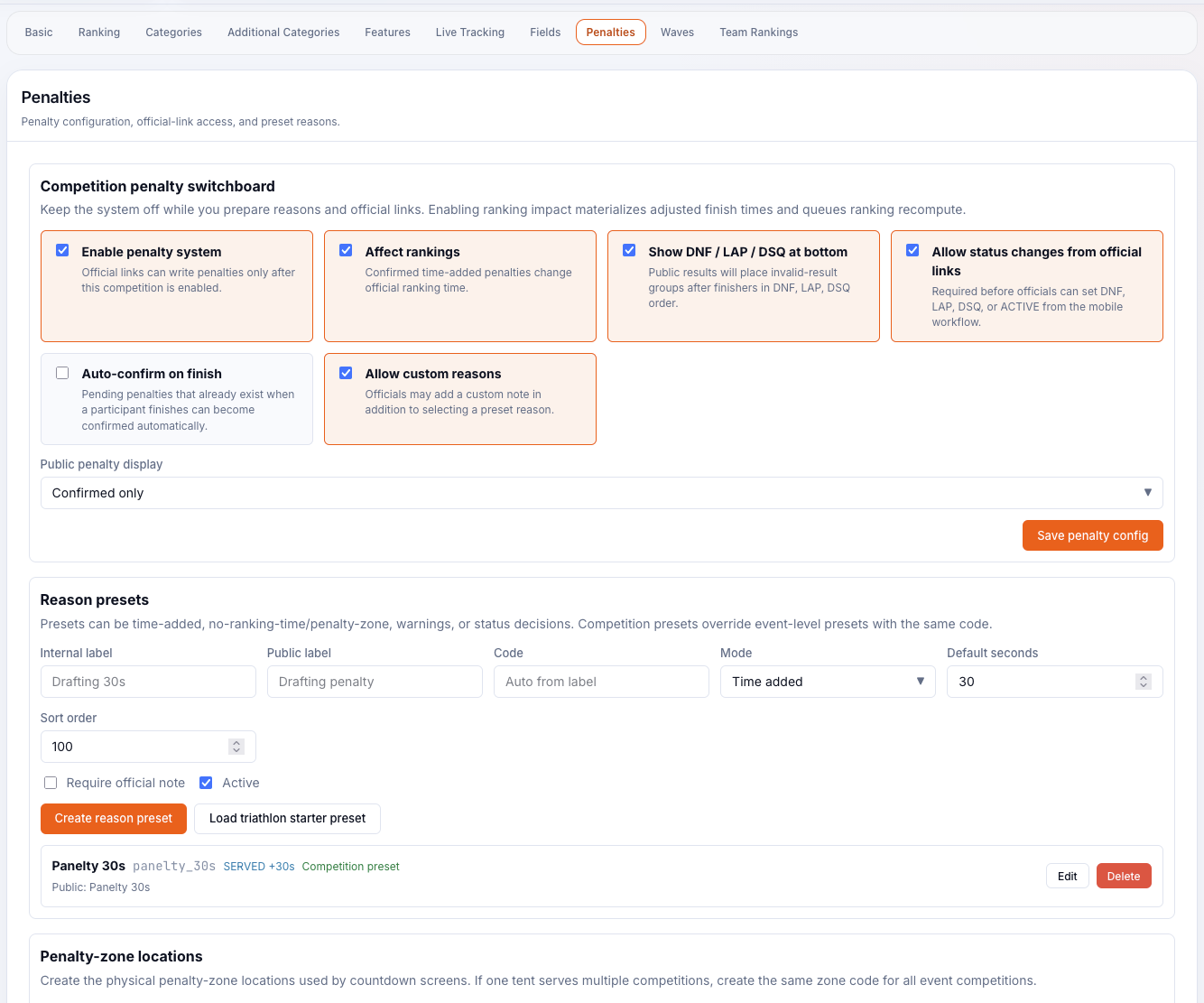
Competition penalty switchboard - toggles to enable the system, affect rankings and choose the public display mode, a reason-presets table and penalty-zone locations
The officials app

A phone-sized desk for the people out on the course.

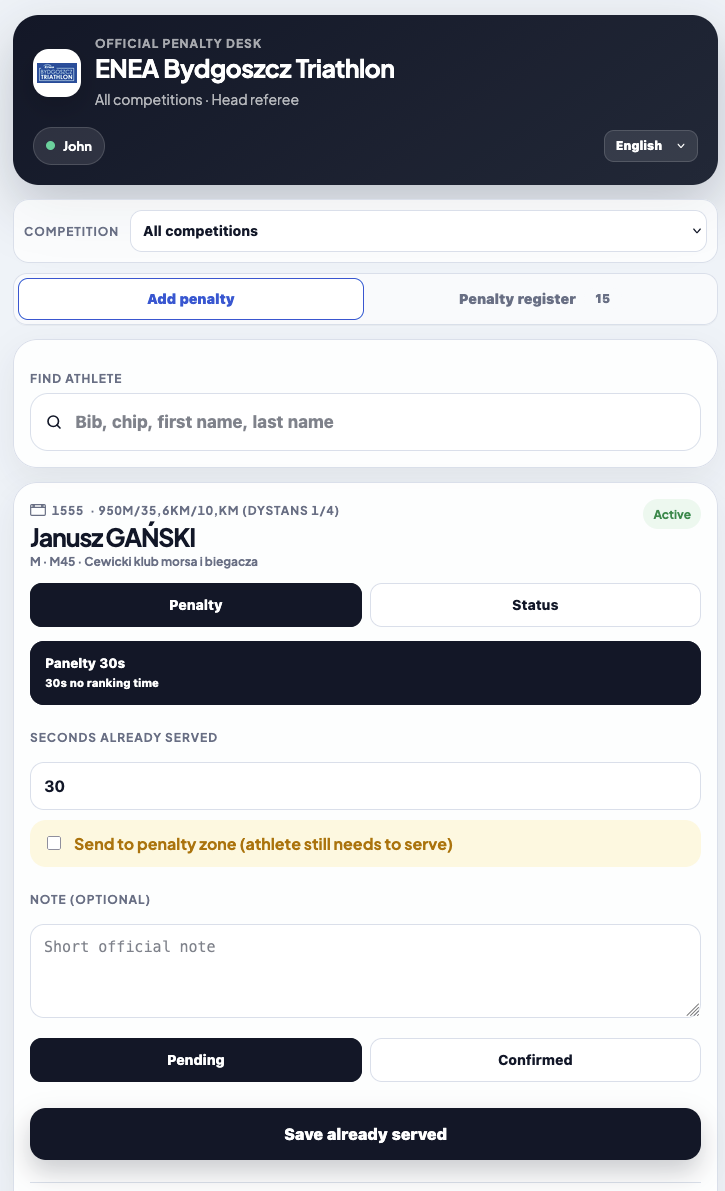
Officials work from a chromeless mobile app - no clutter, just the decision in front of them. They identify themselves first, find the athlete, and issue the penalty. Time penalties over 60 seconds ask for an explicit confirm, and every action is logged with who did it.

Mobile Official Penalty Desk - head referee header, find an athlete by bib/chip/name, Penalty/Status toggle, a 30s preset, seconds served and a Send to penalty zone checkbox
Issuing a penalty. Find an athlete by bib, chip or name, then choose Penalty or Status. Pick a preset - say "Penalty 30s · 30s no ranking time" - note any seconds already served, and tick Send to penalty zone if the time is still to be counted down. Save, and it lands as pending or confirmed.
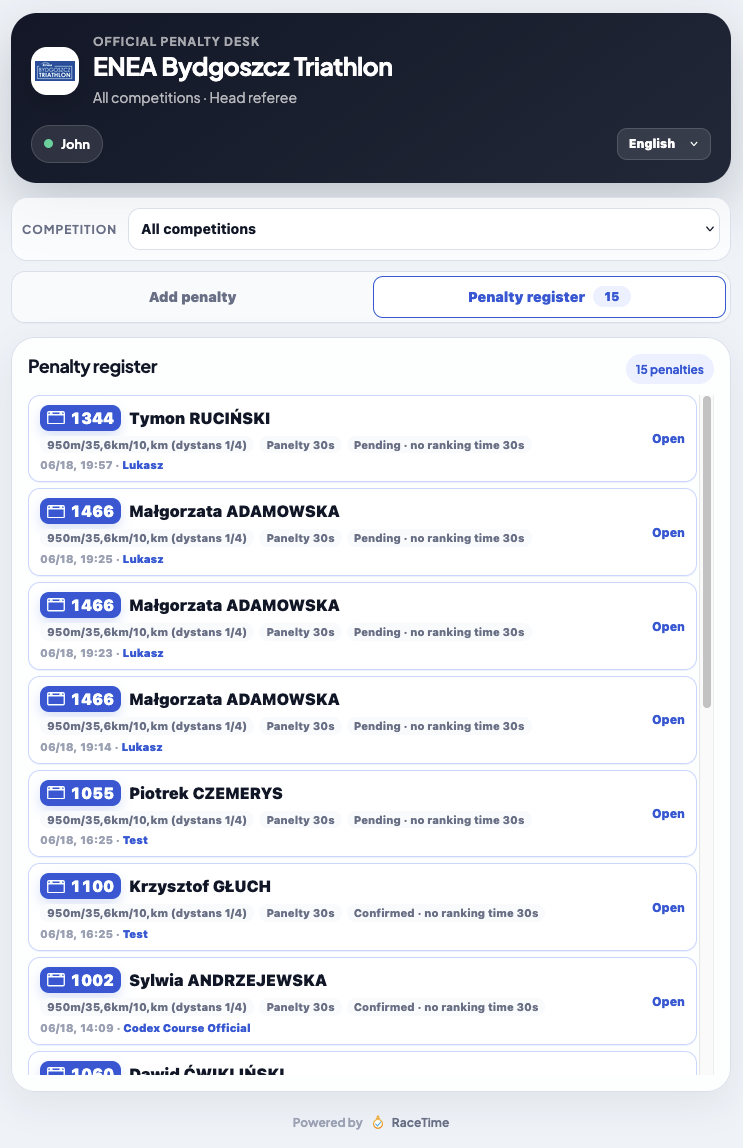
Mobile Penalty register - a per-athlete list with bib, name, pending/confirmed, '30s no ranking time' and who issued each penalty
The register. Every decision in one list: bib, name, pending or confirmed, the reason ("30s no ranking time"), and the official who issued it. Nothing gets lost in a notebook - it's all on the record, instantly.
The penalty zone

The penalty box, run on screens instead of stopwatches.

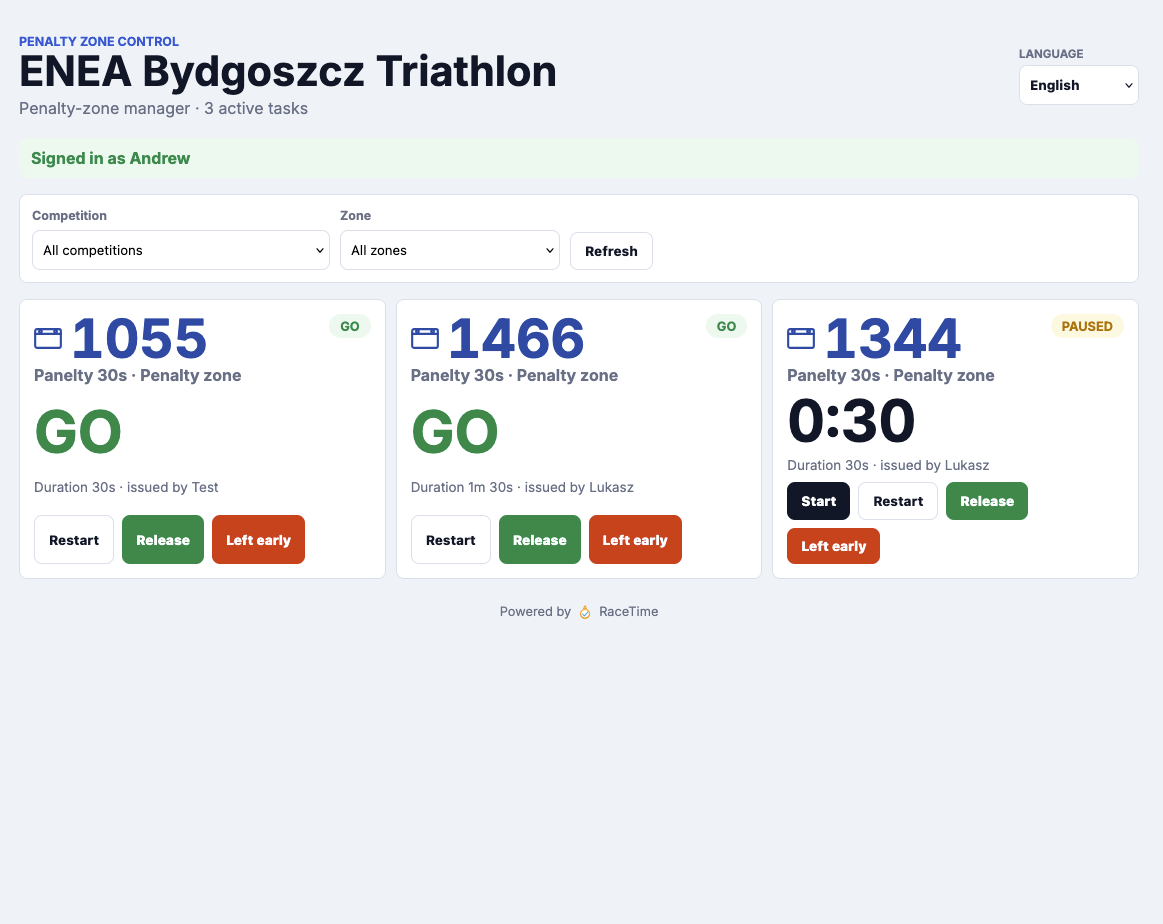
A course official issues "bib 1024, 30s to serve". The zone manager runs the countdown on a control screen, and a big field-facing display tells the athlete exactly when they're free to go.

Penalty-zone control - competition and zone filters, one card per athlete with bib, a green GO or a live 0:30 countdown, and Start, Restart, Release and Left early actions
The control screen. Filter by competition and zone, then one card per athlete: bib, a live countdown or a green GO, and the actions the manager needs - Start, Restart, Release, or mark Left early.
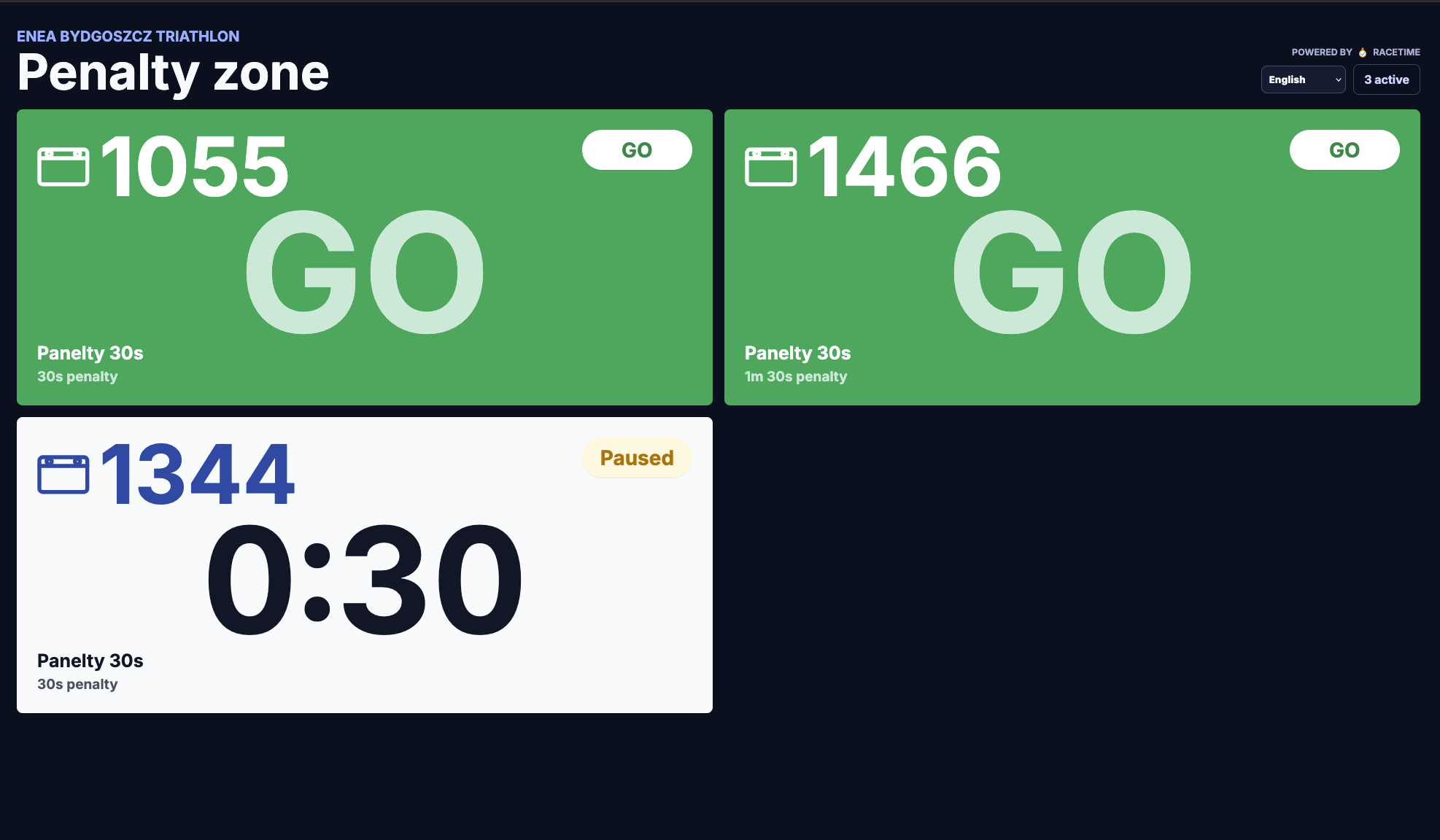
Penalty-zone big-screen display - dark layout with large GO cards and a 0:30 countdown, readable across the tent
The big screen. A dark, high-contrast display for the tent: each waiting athlete with a bold countdown, flipping to a clear GO when the timer hits zero. Readable from across the field, no squinting at a phone.
Into the rankings

Confirm a penalty, and the results catch up by themselves.

A confirmed time-added penalty refreshes the athlete's adjusted time and re-ranks the field automatically. The public list shows the adjusted official time as the headline, with the raw time underneath as the explanation. Served, warning and pending markers never change time, and a DSQ row never shows a final time at all. In the admin Times Table, a compact penalty column and a "Manage penalties" quick action keep it all one click away.

Hidden
Penalties stay off the public results entirely - useful while decisions are still in flight.
Confirmed only
Spectators see confirmed penalties; pending ones stay private until they're settled.
Pending + confirmed
Show both, so the audience can follow decisions as they happen.
Adjusted time
Primary on the public list; the raw time sits below as the secondary explanation.
Invalid results
DSQ rows never show a final time; DNF and LAP can group at the bottom on their own.
Also in RaceTime today

More for officials.

Want a penalty system that fits your rule book?

It's included in your free trial - full access, with a direct line to the team building it.

Try it free →
Keep reading